
How to Open a JSON File as a Table on Windows (Excel, PowerShell and a Viewer)
The quickest way to see a JSON file as a table on Windows is Excel's Power Query (Data > Get Data > From File > From JSON), or PowerShell's Out-GridView for a simple list of objects. A dedicated viewer is easier when the file is large or heavily nested. This guide shows all three, with their limits.
What kind of JSON can become a table?
A table works best when the file is an array of similar objects, for example a list of users where each has an id, name and email. Each object becomes a row and each key becomes a column.
Nested data is harder. A key like user with name and email inside it has to be flattened into columns such as user.name and user.email, or expanded in steps.
How do I open JSON as a table in Excel?
Menu names can differ slightly between Excel versions. This route is powerful if you need to analyze or reshape the data, but it takes several steps per file, and arrays inside a cell need extra expanding.
- In Excel, go to Data > Get Data > From File > From JSON.
- Choose your file. The Power Query Editor opens.
- If you see a list, click To Table (Transform tab), then accept the defaults.
- Click the expand icon in the column header to turn records into columns. Repeat for nested records.
- Click Close & Load to put the result in a sheet.
How do I view JSON as a table with PowerShell?
PowerShell is already on Windows. For a file that is an array of flat objects, this opens a sortable grid in Windows PowerShell:
- Open Windows PowerShell from the Start menu.
- Run: Get-Content .\users.json -Raw | ConvertFrom-Json | Out-GridView
- Use the filter box at the top of the grid to search rows.
- For text output instead, replace Out-GridView with Format-Table.
- Nested objects usually show up as a type name instead of their content, so this works best for flat data.
- Out-GridView may not be available in every PowerShell edition. Format-Table works everywhere.
- Very large files are loaded fully into memory first, which can be slow.
What is a faster way to browse a JSON file?
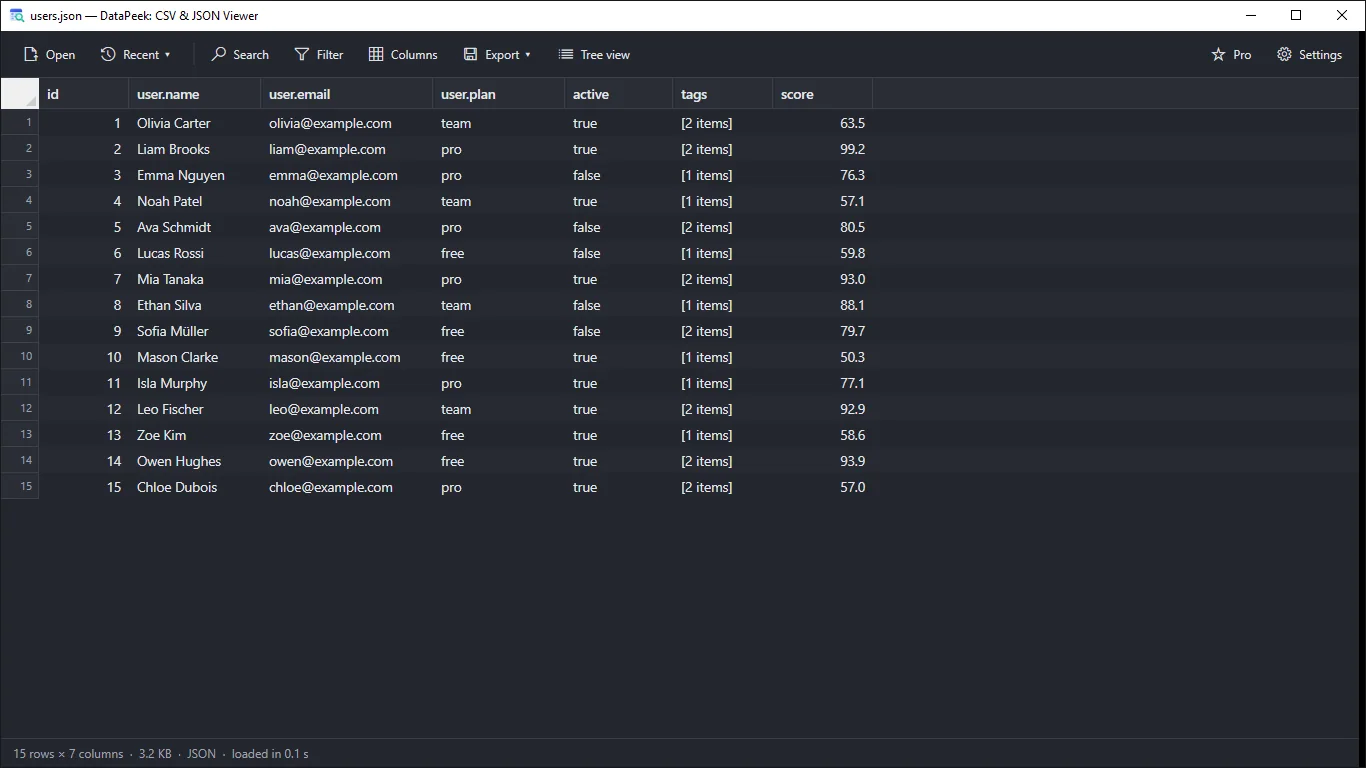
For quick looks, a read-only viewer avoids setup. DataPeek from LoopOtter opens CSV, TSV, JSON, JSONL and NDJSON files by button, drag and drop, or Open with. JSON arrays appear as a table with nested keys flattened, so a user object shows as user.name and user.email columns. The screenshot shows a 15-row file loaded in 0.1 s.
You can sort by a column, search the whole table with Ctrl+F and use a quick column filter. Pro adds AND/OR conditions and regex filters. DataPeek is read-only, so it will not change your file.
How do I explore deeply nested JSON?
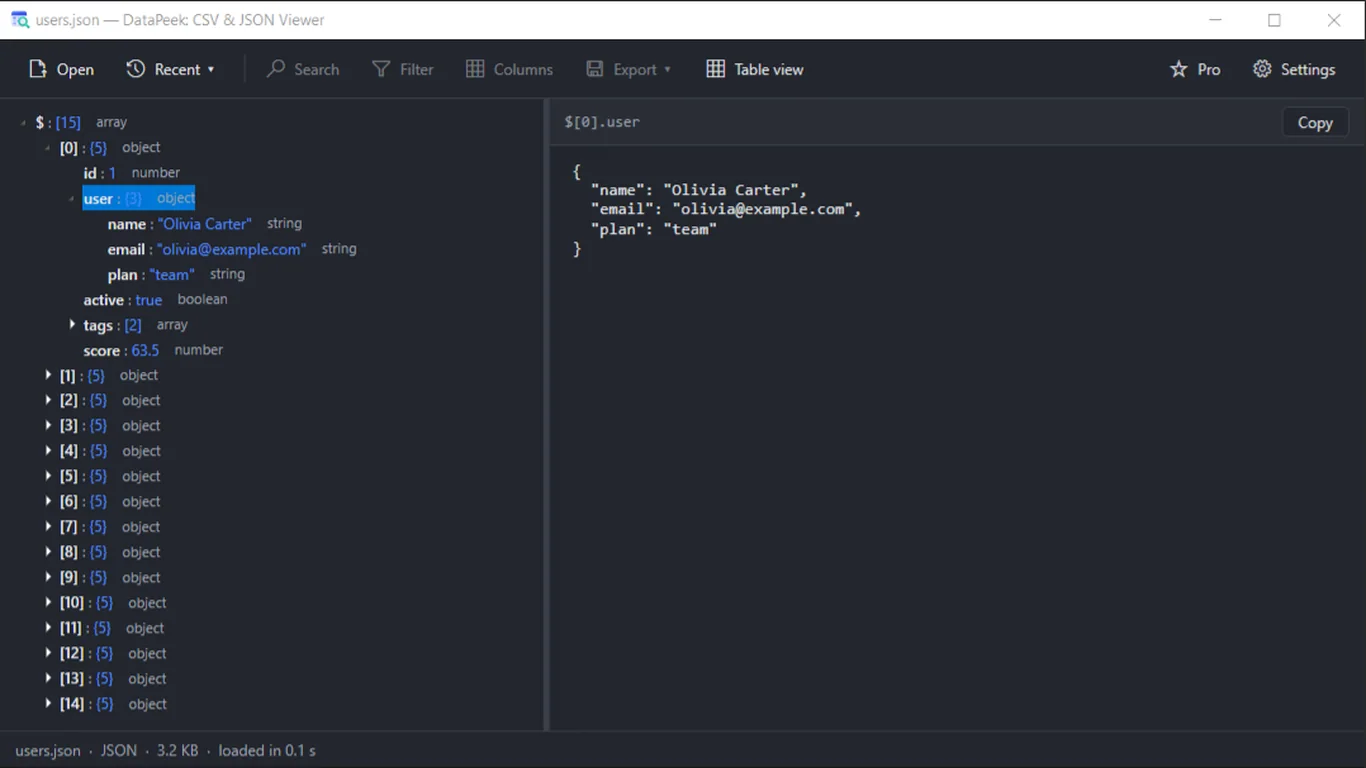
When the structure matters more than the rows, use a tree. In DataPeek, click Tree view. Items expand lazily, and the selected node shows as formatted JSON in a split pane, with a Copy button for its path or value.
In VS Code you can also collapse and expand objects, and with the built-in formatter you can pretty-print minified files.
Which method should I choose?
- Need to analyze, pivot or chart the data: Excel Power Query.
- Small flat list and you already use the console: PowerShell.
- Just need to look, search or filter, especially in a big file: a viewer such as DataPeek.
- Need to edit the JSON: use a text editor such as VS Code.
Tools for this
DataPeek: CSV & JSON Viewer
Open large CSV, TSV, and JSON files instantly as a table or tree. Fast, read-only, and completely offline.
FAQ
How do I open a JSON file in Excel?
Use Data > Get Data > From File > From JSON, then convert the list to a table and expand the columns in Power Query. Click Close & Load to place it in a sheet.
Can Notepad show JSON as a table?
No. Notepad shows the raw text only. Use Excel, PowerShell or a JSON viewer for a table.
What happens to nested keys in a table?
They have to be flattened or expanded. Excel does this by expanding columns step by step. DataPeek flattens them automatically into names like user.name.
Can DataPeek edit my JSON file?
No. It is read-only: you can view, search, filter, sort and export, but the original file is not modified.